SQL - Structured Query Language
RDBMS - Relational Databases
Some of the acronyms used
- RDBMS - Relational database management system
- SQL - Structured Query Language
- DDL - Data definition language
- DML - Data Manipulation Language
- Database schema
- ACID - Atomicity, Consistency, Isolation, Durability
- CRUD - Create, read, update and delete
- Candidate key
- Cartesian product
- Database normalization
Popular Relational Databases
There are a number of popular database system that provide relational models. In the old days these were only providing relational databases, but with the popularization of the so-called “NoQSL databases” many of these systems started to include elements that are not relational. In other words, these system can be used as RDBMS-es, but often also as other types of databases.
Propriatery
Open Source
- MySQL (though it belongs to Oracle)
- PostgreSQL
- SQLite (embedded, public domain)
Wikipedia has long list of relational database management systems.
NoSQL
NoSQL is a popular name for a lot of very different databases. The common denominator is that their primary model is not relational and their primary interface is not SQL.
A few of the popular NoSQL systems:
Wikipedia has a large list of NoSQL software and tools.
SQL Standards
SQL is a language and it has several standards. Different database engines and different versions of the same database engine might be capable of usind different version of the standard. Some also extend the standard and some only partially support the standard.
In other words: When learning SQL you need to learn the general concepts and the particular dialect of the dabase system you use.
- 1986
- …
- 1999
- …
- 2011
Description
An RDBMS holds data in tables. The columns of each table has names describing the value they hold. Each row in this dable contains the data.
Schemas
A schema is the definition of the table: the names of the tables, the names of the columns, the types of data in each column. It also includes some other database elements. (e.g. index)
Usually each project has its own schema and usually there is no relation between data in one schema and another schema.
Each databse usually can hold several schemas.
So you can have a database server that holds multiple schemas.
Though SQ is usually case-insensitive, some people prefer to write every SQL word in upper-case letters and every user-specified field in lower-case. We’ll use this style.
A number of the keywords in the SQL language:
- CREATE
- ALTER
- INSERT INTO
- SELECT
- UPDATE
- DELETE
- TABLE
- INDEX
- FROM
- WHERE
CREATE TABLE
Before we can add data to our database we need to create one or more tables to hold the data. For this we use the DDL (Data Definition Languagea), which part of the SQL language, of dialect in the database system we use.
The statement starts with CREATE TABLE followed by the name of the table. Then in parenthese we have the name and the type of each column.
Optionally we can have comments after two dash-es.
- DDL - Data definition language (part of SQL)
- Column name
- Column type
- Comments
Some of the popular column types:
- ENUM
- VARCHAR
- FLOAT
- INTEGER
- DATE
CREATE TABLE person (
    name       VARCHAR(100),
    height     FLOAT,         -- in meter
    weight     INTEGER,       -- in kg
    birthday   DATE,
    occupation VARCHAR(100),
    gender     ENUM('male', 'female')
);
DML - Data Manipulation Language
The DML is another part of SQL.
- INSERT
- UPDATE
- DELETE
- SELECT
INSERT INTO
We use INSERT INTO and VALUES to add data to a given table. In these examples we also used the DATE function to create a date-type value from a string.
INSERT INTO person (name, height, weight, birthday, occupation, gender)
       VALUES ("Musashimaru Koyo", 1.92, 235, DATE('1971-05-02'), 'sumo wrestler', 'male');

INSERT INTO person (name, height, weight, birthday, occupation, gender)
       VALUES ("Tara Nott Cunningham", 1.54, 48, DATE('1972-05-10'), 'weight lifter', 'female');

INSERT INTO person (name, height, weight, birthday, occupation, gender)
       VALUES ("Elisa Di Francisca", 1.77, 65, DATE('1982-12-13'), 'foil fencer', 'female');

INSERT INTO person (name, birthday, occupation, gender)
       VALUES ("Alfréd Hajos", DATE('1878-02-01'), 'swimmer', 'male');

INSERT INTO person (name, height, weight, birthday, occupation, gender)
       VALUES ("Krisztina Egerszegi", 1.74, 57, DATE('1974-08-16'), 'swimmer', 'female');

INSERT INTO person (name, height, weight, occupation, gender)
       VALUES ("Sharran Alexander", 1.82, 203, 'sumo wrestler', 'female');
Reject INSERT
The INSERT migh be rejected for various reasons. e.g. Incorrect type of data.
Here we try to insert a string "tall" for the height column while our table definition indicated that it is a FLOAT.
INSERT INTO person (name, height, weight, birthday, occupation, gender)
       VALUES ("Foo Bar", "tall", 100, DATE('1971-05-02'), 'sportsman', 'male');
ERROR 1265 (01000): Data truncated for column 'height' at row 1
SELECT FROM
We use the SELECT FROM expression to fetch data from the database. The * means that we would like to see all the columns. After the FROM we put the table.
Instead of the * we could select specific columns, reducing the data transfer. We could also add a WHERE clause to filter the rows according to some condition.
We could also use multiple tables and their relationship.
SELECT * FROM person;
select * from person;
+----------------------+--------+--------+------------+---------------+--------+
| name                 | height | weight | birthday   | occupation    | gender |
+----------------------+--------+--------+------------+---------------+--------+
| Musashimaru Koyo     |   1.92 |    235 | 1971-05-02 | sumo wrestler | male   |
| Tara Nott Cunningham |   1.54 |     48 | 1972-05-10 | weight lifter | female |
| Elisa Di Francisca   |   1.77 |     65 | 1982-12-13 | foil fencer   | female |
| Alfrd Hajos          |   NULL |   NULL | 1878-02-01 | swimmer       | male   |
| Krisztina Egerszegi  |   1.74 |     57 | 1974-08-16 | swimmer       | female |
| Sharran Alexander    |   1.82 |    203 | NULL       | sumo wrestler | female |
+----------------------+--------+--------+------------+---------------+--------+
6 rows in set (0.00 sec)
NULL
If a field does not have a value, it has a NULL value in it. It is not the empty string. Not the number 0. It is NULL
SELECT FROM - WHERE
The WHERE clause can be used to filter the columns.
SELECT * FROM person WHERE occupation = "sumo wrestler";
+-------------------+--------+--------+------------+---------------+--------+
| name              | height | weight | birthday   | occupation    | gender |
+-------------------+--------+--------+------------+---------------+--------+
| Musashimaru Koyo  |   1.92 |    235 | 1971-05-02 | sumo wrestler | male   |
| Sharran Alexander |   1.82 |    203 | NULL       | sumo wrestler | female |
+-------------------+--------+--------+------------+---------------+--------+
2 rows in set (0.00 sec)
SELECT FROM - WHERE not
In our WHERE clause we can also use “not equal” (!=).
SELECT * FROM person WHERE occupation != "sumo wrestler";

+----------------------+--------+--------+------------+---------------+--------+
| name                 | height | weight | birthday   | occupation    | gender |
+----------------------+--------+--------+------------+---------------+--------+
| Tara Nott Cunningham |   1.54 |     48 | 1972-05-10 | weight lifter | female |
| Elisa Di Francisca   |   1.77 |     65 | 1982-12-13 | foil fencer   | female |
| Alfrd Hajos          |   NULL |   NULL | 1878-02-01 | swimmer       | male   |
| Krisztina Egerszegi  |   1.74 |     57 | 1974-08-16 | swimmer       | female |
+----------------------+--------+--------+------------+---------------+--------+
4 rows in set (0.00 sec)
SELECT columns FROM - WHERE
SELECT name, weight, height FROM person WHERE occupation = "sumo wrestler";
Aggregates
- COUNT
SELECT COUNT(*) FROM person;
constraints
- NOT NULL
- UNIQUE
- PRIMARY KEY
CREATE TABLE car (
    owner_name    VARCHAR(100),
    color         VARCHAR(20) NOT NULL,
    license_plate VARCHAR(20) UNIQUE,
    motor_number  VARCHAR(20) UNIQUE NOT NULL
);
INSERT INTO car (owner_name, color, license_plate, motor_number)
       VALUES ("Foo Bar", "Blue", "12-345-67", "DFAFD3243EGGER");
INSERT INTO car (color, motor_number)
       VALUES ("Yellow", "GFAFD3243EGGER");
INSERT INTO car (color, motor_number)
       VALUES ("White", "GFAFD3243EGGER");
PRIMARY KEY
ACID
SQL Injection attack
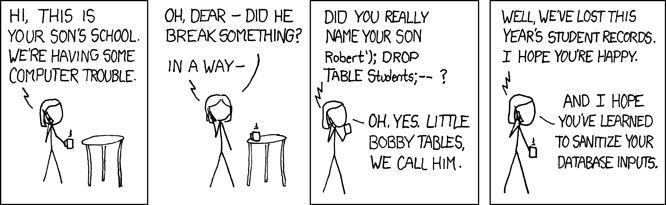
Bobby Tables
Bobby Tables. Image from xkcd.
License plate for SQL Injection attack